1. 프로그래밍 개념 이해
- Program이란? : 해야 할 일을 미리 기술해 놓은 것
- Programming?
인간의 언어
↓ 번역(프로그래머)
프로그래밍 언어 : C, Java, Python, SQL, .... HTML, ...
↓ 번역(software : compiler, interpreter, ...)
기계어
- List of programming languages : en.wikipedia.org/wiki/List_of_programming_languages
List of programming languages - Wikipedia
en.wikipedia.org
- Compiled Versus Interpreted Languages : guide.freecodecamp.org/computer-science/compiled-versus-interpreted-languages/
Interpreted vs Compiled Programming Languages: What's the Difference?
Every program is a set of instructions, whether it’s to add two numbers or send a request over the internet. Compilers and interpreters take human-readable code and convert it to computer-readable machine code. In a compiled language, the target machine
www.freecodecamp.org
2. Object-Oriented Programming Concepts
docs.oracle.com/javase/tutorial/java/concepts/index.html
Lesson: Object-Oriented Programming Concepts (The Java™ Tutorials > Learning the Java Language)
The Java Tutorials have been written for JDK 8. Examples and practices described in this page don't take advantage of improvements introduced in later releases and might use technology no longer available. See Java Language Changes for a summary of updated
docs.oracle.com
- What Is an Object?
- What Is a Class?
* 자바 코딩할 때 주의할 점
-> 클래스명과 파일명은 반드시 일치해야 한다
-> 파일 확장자는 반드시 .java로 끝나야 한다
* 명명 규칙
-> 클래스 : 이것이 자바다 p.192
-> 변수 : 이것이 자바다 p.31
-> 메소드 : 이것이 자바다 p.216
예제) 자바 프로젝트 - 패키지 - 클래스: Bicycle


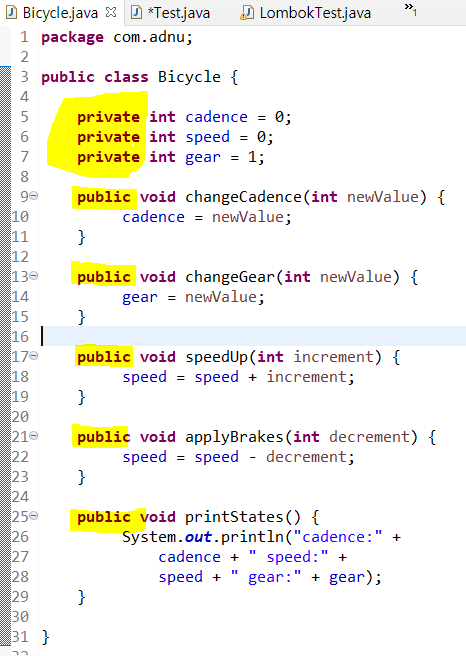
- 접근 제한자
- public: 클래스, 필드, 생성자, 메소드에 적용 / 접근할 수 있는 클래스 없음
- protected: 필드, 생성자, 메소드에 적용 / 접근할 수 있는 클래스: 자식 클래스가 아닌 다른 패키지에 소속된 클래스
- default: 클래스, 필드, 생성자, 메소드에 적용 / 접근할 수 있는 클래스: 다른 패키지에 소속된 클래스
- private: 필드, 생성자, 메소드에 적용 / 모든 외부 클래스
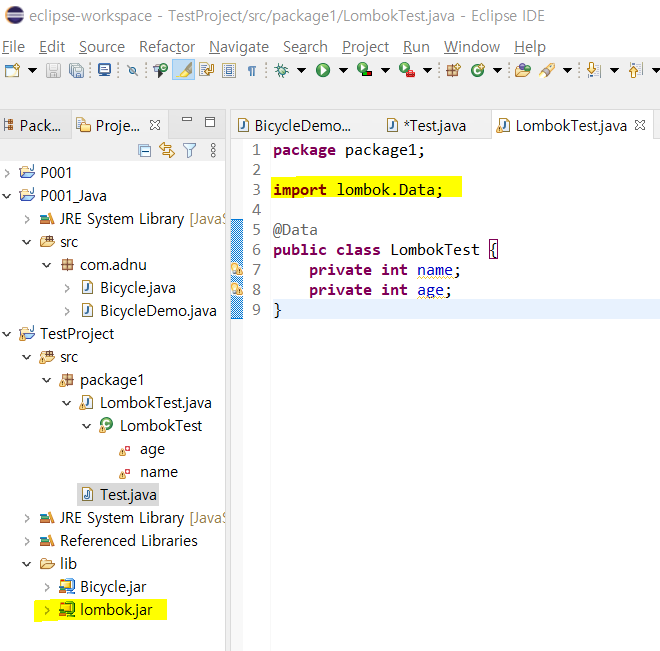
+ Build Path 설정하기: lib 폴더 (아무것도 없는 일반 폴더) 안에 있는 라이브러리(.jar) 파일을 Configure Build Path로 설정, Add JARs 버튼을 클릭하여 Path를 추가하면 패키지 사용이 가능
( 참고사이트 : backback.tistory.com/217)
build path 설정 방법
1. 빌드 패스 설정 창 열기 방법 1) 프로젝트 -> Build path ->Configure Build Path... 방법 2) 2. 설정하기 Source탭을 선택한다. Default로 설정된 output folder를 변경해 주어야 한다. Browse 버튼 클릭!..
backback.tistory.com
+ 롬복(Lombok) 패키지: getter와 setter를 함수 없이 사용할 수 있게 해주는 패키지
Download
projectlombok.org
'데이터 [Data] > Java & JSP' 카테고리의 다른 글
| 상속 (0) | 2021.04.29 |
|---|---|
| Scanner, Switch문을 활용한 사칙연산 계산기 (0) | 2021.04.29 |
| 조건문과 반복문 (0) | 2021.04.29 |
| Scanner 클래스 예제 (0) | 2021.04.29 |
| 객체지향 프로그래밍(OOP; Object-Oriented Programming) (0) | 2021.04.28 |


댓글